
Oxygen Forensic® Detective v.18.1 Official Activation
4.5 GB
18.1.X
Mobile Forensic Experience & Windows PC
747

Description
Key features include:
- Screenshot capture via iOS Agent
- Chain extractions
- Slack account data import
- Automation updates
- Check for app parsing package updates
Mobile Forensic Updates
Screenshot capture via iOS Agent
Chain extractions
Android Agent updates
Brute Force Module Updates
Computer Artifacts Updates
Carving enhancements
Enhanced search by file signature
New artifacts and other updates
View all
Import Updates
Import of Slack account data
Updated Huawei HiSuite backups
Automation Updates
Enhanced CLI support
Applications
Check for app parsing package updates
Cryptocurrency section
General Updates
View all
Oxygen Forensic® Detective v.18
Key features include:
- Multi-source extraction via Android Agent
- Search for a string in multiple languages at once
- Support for macOS 26
- Parsing of unsupported apps by parent app parsing rules
- Parsing of the ChatGPT app
Mobile Forensic Updates
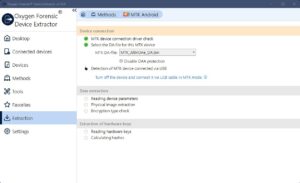
Multi-source extraction via Android Agent
We have added the ability to collect multiple third-party apps and other data types into one extraction using Android Agent. Now, before manually extracting data with Android Agent, you can select different data categories from logical extraction (calls, contacts, calendars, and more) and multiple third-party apps. As a result, a single file and a folder with the extracted files are generated in one extraction, simplifying the workflow.
Automatic device detection improvements
We have added extended information about the connected device and have improved auto-detection of exploited vulnerabilities for the full file system method. In the full file system method, the first vulnerability shown for the connected device is now the most relevant that provides the best extraction results.
Updates to data extraction via checkm8
We now support the following devices via the checkm8 method:
- iPad Pro 12.9-inch (1st gen)
- iPad Pro 9.7-inch running iOS 12.0 – 16.7.11
- iPad 7th gen running iOS 18.0-18.6.2
- all supported iOS devices running iOS 12.0 and above
Brute Force Module Updates
Encrypted Adobe Acrobat PDF files
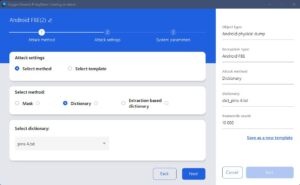
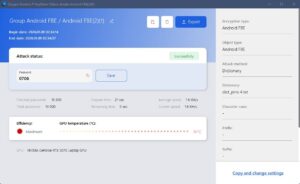
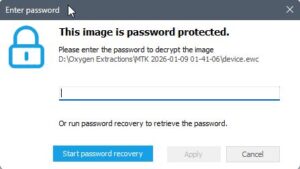
We have added the ability to find passcodes to encrypted Adobe Acrobat PDF files. To brute force the password, you need to upload a file into the KeyDiver module, and the hash will be detected automatically. Supported versions are:
- PDF 1.7 ExtensionLevel 8, Acrobat 10 – 11
- PDF 1.7 ExtensionLevel 3, Acrobat 9
- PDF 1.4 – 1.6, Acrobat 5 – 8
- PDF 1.4 – 1.6, Acrobat 5 – 8
- PDF 1.1 – 1.3, Acrobat 2 – 4
- PDF 1.1 – 1.3, Acrobat 2 – 4
- PDF 1.1 – 1.3, Acrobat 2 – 4
1Password account brute force
We have also added the ability to brute force 1Password account passwords using known hashes.
Computer Artifacts Updates
Document and image carving
We’ve introduced support for extracting JPEG and PDF files from the unallocated space of NTFS partitions. To use this feature, enable File Carving in the KeyScout Search Rules settings and select either Image or Document. Recovered files will appear in the Files tab.
We have also simplified the navigation and prompt the system to facilitate the configuration of profiles containing file carving search rules.
New and other updates
The following new computer artifacts are supported for extraction:
- The Bat! data from Windows
- Battle.net data from Windows
- Imo Messenger data from macOS
We have also added support for macOS 26 Tahoe (beta 8).
Search Updates
Search for mnemonic phrases
We have added the ability to search for mnemonic (seed) phrases. A new Mnemonic Phrase tab has been added to the Search section, which allows searching for words from mnemonic phrases using dictionaries.
The following dictionaries are supported:
- BIP39 — supported languages: Chinese, Czech, English, French, Italian, Japanese, Portuguese, and Spanish
- SLIP39 — mnemonic phrases supported only in English.
The phrase search results display a list of words of the specified length from the selected BIP39 or SLIP39 dictionaries.
Search for a string in multiple languages at once
In Oxygen Forensic® Detective v.18.0 search across multiple languages has been implemented using the Translation module. The value entered in the Search field is translated into the specified languages, after which the search is performed both for the original and the translated values. The search for translated values is available only if the TextTranslate language add-on is installed. It is available at no additional charge in the Customer Area.
Support for Verizon Call Data Records
We have added the ability to import Verizon call data records and cell tower library files as well as display cell towers, sectors, and beamwidth on the Maps tool.
Applications
Parsing of unsupported apps by parent app parsing rules
We’ve added support for parsing data from applications that are not officially supported by using templates. When you select an unsupported application in the Applications section, the Select Parent Application button becomes enabled on the toolbar. After you choose a parent application and start the analysis, the data is extracted and processed using the parent application’s parsing rules. Parsing works correctly only if the unsupported app is a clone of the parent app. If a parent application is selected, the unsupported app’s data will be analyzed automatically in all subsequent imports in Oxygen Forensic® Detective.
Parsing of ChatGPT app
We have added support for ChatGPT app parsing from Android and iOS devices. Parsed data set will include accounts, projects, chats, cookies, drafts, cache, and other data.
Android data parsing updates
We have improved collection and processing of system information and telemetry from Android devices: app launches and usage, granted permissions, power-on/reboot/shutdown events, and default apps.
Images
Download links
📘 Course: How to Download and Start
Learning
You're on the right page! Follow these steps to get started:
✅ Steps:
- Click the Download Button
Tap the “Download” button below to get the course files.
- Save the Files
Choose a folder on your device where you can easily find the files.
- Extract the Files (if zipped)
If it’s a ZIP file, right-click and select “Extract” to open it.
- Open the Materials
Use a PDF reader or video player to access the course content.
- Start Learning
Go through the materials at your own pace and enjoy the course!
Need Help?
Contact us at [agbajeflows@gmail.com]
Most viewed Courses
-
![[2025] Microsoft Azure, Power BI, Security Certification Udemy Courses Free with Coupon – Limited-Time Access](data:image/png;base64,iVBORw0KGgoAAAANSUhEUgAAAI4AAACNAQMAAABbp9DlAAAAA1BMVEUUHCkYkPNHAAAAGUlEQVRIx+3BMQEAAADCIPunNsU+YAAA0DsKdwABBBTMnAAAAABJRU5ErkJggg==) [2025] Microsoft Azure, Power BI, Security Certification Udemy Courses Free with Coupon – Limited-Time Access
[2025] Microsoft Azure, Power BI, Security Certification Udemy Courses Free with Coupon – Limited-Time Access -
PHP for Beginners: PHP Crash Course – Free Udemy Course with Coupon
-
🎓 Top Free Premium Udemy Courses with Verified Coupons – Level Up in Tech, AI, DevOps & More [ June 2025 ]
-
Computer Science MetaBootcamp: Beginner to Intermediate 2025 (100% Free w/ Coupon!)
-
Python 101 – Python Programming & Functions (2025) Free Limited-Time Access
-
![[2025] Microsoft Azure, Power BI, Security Certification Udemy Courses Free with Coupon – Limited-Time Access](https://coursejoint.com/wp-content/uploads/2025/07/2025-Microsoft-Azure-Power-BI-Security-Certification-Udemy-Courses-Free-with-Coupon-–-Limited-Time-Access-75x75.png)

![🎓 Top Free Premium Udemy Courses with Verified Coupons – Level Up in Tech, AI, DevOps & More [ June 2025 ]](https://coursejoint.com/wp-content/uploads/2025/06/🎓-Top-Free-Premium-Udemy-Courses-with-Verified-Coupons-–-Level-Up-in-Tech-AI-DevOps-More-June-2025--75x75.jpg)

